Wednesday, October 31, 2012

DistMesh : A simple Mesh Generator for Matlab

During the programming of my finite element code, I was in need of a mesh generator in order to not be constrained to only rectangular plates. The variety of the different code available is quite impressive. After testing several codes, my personal choice is DistMesh, a generator able to produce triangles and tetrahedrons.
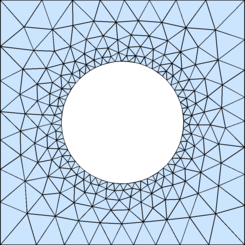
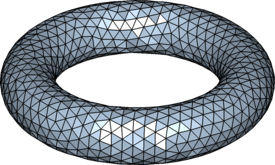
     

DistMesh author's website : http://persson.berkeley.edu/distmesh/

The only issue I had with DistMesh is that it is unable to produce 6 node triangles. My quick fix consisted in modifying the function triangulation_l2q from John Burkardt. It is now possible to feed the node connectivity matrix and the node list to the function to obtain a new node connectivity matrix and a new node list.

Here is my modified version of the function

function [p t]=triangulation_l2q (p,t)
%
%% MAIN is the main program for TRIANGULATION_L2Q.
%
%  Discussion:
%
%    TRIANGULATION_L2Q makes a quadratic triangulation from a linear one.
%
%  Usage:
%
%    triangulation_l2q ( p, t )
%
%    where p is nodelist and t is the node element connection matrix.
...

This solution is not as good as if distmesh was able to handle 6 node triangles since it doesn't follow the exact contour given to DistMesh.

Faster computation with MatLab

In my work, I have to deal with everyday computation efficiency problems with Matlab. Indeed, generating stiffness and mass matrices can take quite a long time. Maybe you don't want to achieve the best performing code ever since you don't have a super computer anyway, but you maybe still want to do efficient programming. Therefore, here are some good programming habits that should be useful:
  • Avoid loops. It may seem strange but Matlab takes quite a long time to run those loops, especially when accessing large matrices. It is therefore, when possible, much faster to replace those loops with a matricial generation.
For example, the following code is quite slow since it needs to access 250 000 times to the matrix K.

clear all;
tic();
Mmax=500;
Nmax=500;
K=zeros(Mmax+1,Nmax+1);
for m=0:1:Mmax
    for n=0:1:Nmax
        K(m+1,n+1)=m*n*sin(m*pi)*sin(n*pi);
    end
end
toc();
Elapsed time is 3.136801 seconds.

It could easily be replaced by this same code which creates the whole matrix K2 at once through a vector product.
clear all;
tic();
Mmax=500;
Nmax=500;
m=0:1:Mmax;%m is a vector here
n=0:1:Nmax;%n is a vector here
K2=(m.*sin(m*pi))'*(n.*sin(n*pi));
toc();
Elapsed time is 0.010542 seconds.
  • Play with the dimensions. When generating a stiffness matrix with the finite element method you may have to enter a structure like this when integrating over the Gauss points:
clear all;
tic();
Mmax=500;
Nmax=500;
K=zeros(Mmax+1,1);
for m=0:1:Mmax
    for n=0:1:Nmax
        K(m+1)=K(m+1)+m*n*sin(m*pi)*sin(n*pi);
    end
end
toc();
Elapsed time is 0.021230 seconds. 

In this case it is more interesting to create an array first and then sum over one dimension. Therefore, you could do:
clear all;
tic();
Mmax=500;
Nmax=500;
m=0:1:Mmax;%m is a vector here
n=0:1:Nmax;%n is a vector here
K2=sum((m.*sin(m*pi))'*(n.*sin(n*pi)),2);
toc();
Elapsed time is 0.001119 seconds. 

And of course :
  • Always preallocate arrays when possible so you avoid messages like "The variable 'B' appears to change size on every loop iteration. Consider preallocating for speed."
    In this case, Matlab help will guide you, but the general solution would be to use the command zeros which preallocate your array with zeros; the parameters of this function are the size of every dimension of your array.
Mmax=500;
Nmax=500;
K=zeros(Mmax+1,Nmax+1);